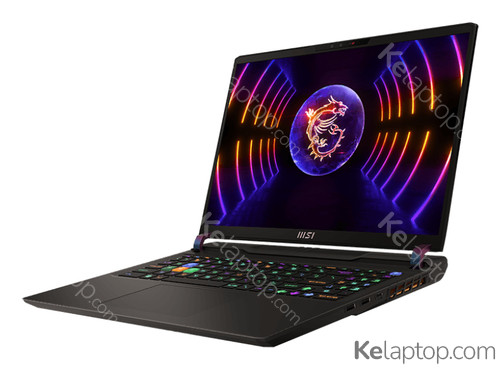
MSI Vector GP68 HX 13VH-273PL
Specs
Prices

Main specs
| Processor | |
|---|---|
| Screen | 16" 2560x1600 IPS 240Hz |
| Hard drive | 1TB SSD |
| RAM | 16GB DDR5-SDRAM |
| Operating system | Windows 11 Home |
| Graphics card | NVIDIA GeForce RTX 4080 12GB GDDR6 |
Alternatives with equal or higher power at a similar or lower price

From other brands

Full specifications of MSI Vector GP68 HX 13VH-273PL
| Reference / Part Number | 13VH-273PL |
|---|---|
| Release date | December 2023, 2 years ago |
Design
| Product type | Laptop |
|---|---|
| Product color | Black |
| Form factor | Clamshell |
| Market positioning | Gaming |
Image gallery


Screen
| Display diagonal | 16 " (40,6 cm) |
|---|---|
| Display resolution | 2560 x 1600 pixels |
| Touchscreen | No |
| HD type | Quad HD+ |
| Panel type | IPS |
| Display surface | Matt |
| Anti-glare screen | Yes |
| Display diagonal (metric) | 16 " (40,6 cm) |
| Maximum refresh rate | 240 Hz |
Processor
| Processor family | Intel® Core™ i7 |
|---|---|
| Processor manufacturer | Intel |
| Processor model | i7-13700HX |
| Generación del procesador | Intel Core i7-13xxx |
| Processor cores | 16 |
| Processor threads | 24 |
| Processor boost frequency | 5 GHz |
| Núcleos de rendimiento | 8 |
| Núcleos de eficiencia | 8 |
| Processor cache | 30 MB |
| Processor cache type | Smart Cache |
| Potencia base del procesador | 55 |
| Potencia turbo máxima | 157 |
Memory
| Internal memory | 16 GB |
|---|---|
| Maximum internal memory | 64 GB |
| Internal memory type | DDR5-SDRAM |
| Memory clock speed | 5600 MHz |
Storage
| Total storage capacity | 1 TB |
|---|---|
| Storage media | SSD |
| Optical drive type | No |
| Total SSDs capacity | 1 TB |
| Number of SSDs installed | 1 |
| SSD capacity | 1 TB |
Graphics
| On-board graphics card | Yes |
|---|---|
| Discrete graphics card | Yes |
| Discrete graphics card model | NVIDIA GeForce RTX 4080 |
| On-board graphics card model | Intel® UHD Graphics |
| Discrete GPU manufacturer | NVIDIA |
| Discrete graphics card memory | 12 GB |
| Discrete graphics memory type | GDDR6 |
| Fabricante de GPU (unidad de procesamiento gráfico) integrada | Intel |
| On-board graphics card family | Intel® UHD Graphics |
Camera
| Front camera | Yes |
|---|
Network
| Mobile network connection | No |
|---|---|
| Top Wi-Fi standard | Wi-Fi 6 (802.11ax) |
| Wi-Fi standards | Wi-Fi 6 (802.11ax) |
| Bluetooth | Yes |
Ports & interfaces
| USB 2.0 ports quantity | 2 |
|---|---|
| USB 3.2 Gen 1 (3.1 Gen 1) Type-C ports quantity | 2 |
| Número de puertos Thunderbolt 4 | 1 |
| Intel® Thunderbolt 4 | Yes |
| Combo headphone/mic port | Yes |
Keyboard
| Numeric keypad | Yes |
|---|---|
| Pointing device | Touchpad |
| Keyboard backlit | Yes |
Software
| Operating system installed | Windows 11 Home |
|---|---|
| Operating system architecture | 64-bit |
Battery
| Battery capacity | 90 Wh |
|---|
Security
| Fingerprint reader | Yes |
|---|---|
| Trusted Platform Module (TPM) | Yes |
| Trusted Platform Module (TPM) version | 2.0 |
Weight & dimensions
| Weight | 5.9 lbs (2,67 kg) |
|---|---|
| Width | 14.1 " (357 mm) |
| Depth | 11.2 " (284 mm) |
| Height | 1.1 " (28,5 mm) |
Frequently asked questions
Is the MSI Vector GP68 HX 13VH-273PL good for gaming?
You can game on it, though this laptop was not built for it: it carries the dedicated NVIDIA GeForce RTX 4080. Its card's page shows what level it handles current games at.
What is the screen of the MSI Vector GP68 HX 13VH-273PL like?
It carries a 16" 2560x1600 IPS 240Hz display.
Which processor and graphics card does the MSI Vector GP68 HX 13VH-273PL have?
It runs on the Intel Core i7-13700HX processor with the NVIDIA GeForce RTX 4080 graphics. Their pages carry their benchmarks, ranking position and alternatives.
Which operating system does the MSI Vector GP68 HX 13VH-273PL come with?
It comes with Windows 11 Home preinstalled.
Which ports does the MSI Vector GP68 HX 13VH-273PL have?
According to its spec sheet: 1 × Thunderbolt 4, 2 × USB-C, headphone jack (3.5 mm).
Does the MSI Vector GP68 HX 13VH-273PL have a backlit keyboard?
Yes, according to its spec sheet the keyboard is backlit.
Does the MSI Vector GP68 HX 13VH-273PL have a touch screen?
No, according to its spec sheet the screen is not a touch screen.
How much does the MSI Vector GP68 HX 13VH-273PL weigh?
It weighs 2,67 kg: one of the heavy ones, more of a desk machine than a daily commuter.
When was the MSI Vector GP68 HX 13VH-273PL released?
Its release date is December 2023, 2 years ago.