+6
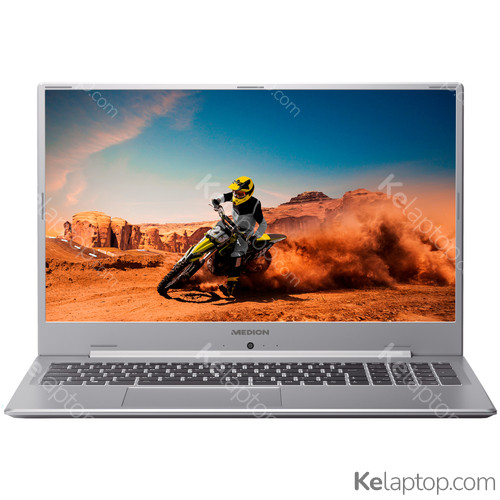
MEDION AKOYA S17403 30031993
Specs
Prices

Main specs
| Processor | Intel Pentium 6405U 2,4GHz |
|---|---|
| Screen | 17.3" 1920x1080 IPS |
| Hard drive | 256GB SSD |
| RAM | 8GB DDR4-SDRAM |
| Operating system | Windows 10 Home |
| Graphics card |
Alternatives with equal or higher power at a similar or lower price
From other brands
- 1

Lenovo IdeaPad 3 14ITL05 81X700FXUS
$3991033 - 2

Acer Aspire Go 15 AG15-21P-R0RR
$389.991032 - 3

Acer Spin 5 SP513-54N-58XD
$399.951031 - 4

Lenovo IdeaPad 3 14IIL05 81WD00U9US
$376531 - 5

Lenovo V V14 G4 ABP 83FG0000US
$395531 - 6

Acer Aspire 3 A315-24P-R7VH
$368531 - 7

Lenovo IdeaPad 1 15AMN7 82VG00BJUS
$3984.930 - 8

ASUS Vivobook 14 X1404VA-I38128
$3884.930 - 9

Acer Aspire 3 A314-36P-3772
$3704.830 - 10

Lenovo IdeaPad Slim 3 15IAN8 82XB00C2US
$335.494.830
Full specifications of MEDION AKOYA S17403 30031993
| Reference / Part Number | 30031993 |
|---|---|
| Release date | February 2022, 4 years ago |
Design
| Product type | Laptop |
|---|---|
| Product color | Metallic |
| Form factor | Clamshell |
| Housing material | Aluminum |
Image gallery


Screen
| Display diagonal | 17.3 " (43,9 cm) |
|---|---|
| Display resolution | 1920 x 1080 pixels |
| Touchscreen | No |
| HD type | Full HD |
| Panel type | IPS |
| LED backlight | Yes |
| Native aspect ratio | 16:9 |
| Display surface | Matt |
| Display diagonal (metric) | 17.3 " (43,9 cm) |
Processor
| Processor family | Intel® Pentium® Gold |
|---|---|
| Processor manufacturer | Intel |
| Processor model | 6405U |
| Processor frequency | 2,4 GHz |
| Processor cores | 2 |
| Processor cache | 2 MB |
Memory
| Internal memory | 8 GB |
|---|---|
| Internal memory type | DDR4-SDRAM |
| Memory clock speed | 2666 MHz |
Storage
| Total storage capacity | 256 GB |
|---|---|
| Storage media | SSD |
| Optical drive type | No |
| Total SSDs capacity | 256 GB |
| Number of SSDs installed | 1 |
| SSD capacity | 256 GB |
| Card reader integrated | Yes |
| Compatible memory cards | SD,SDHC,SDXC |
Graphics
| On-board graphics card | Yes |
|---|---|
| Discrete graphics card | No |
| Discrete graphics card model | Not available |
| On-board graphics card model | Intel® UHD Graphics |
Audio
| Audio system | Dolby Audio |
|---|---|
| Number of built-in speakers | 2 |
| Built-in microphone | Yes |
Camera
| Front camera | Yes |
|---|
Network
| Top Wi-Fi standard | Wi-Fi 5 (802.11ac) |
|---|---|
| Wi-Fi standards | Wi-Fi 5 (802.11ac) |
| Bluetooth | Yes |
Ports & interfaces
| USB 2.0 ports quantity | 1 |
|---|---|
| USB 3.2 Gen 1 (3.1 Gen 1) Type-A ports quantity | 2 |
| USB 3.2 Gen 1 (3.1 Gen 1) Type-C ports quantity | 1 |
| HDMI ports quantity | 1 |
| Headphone outputs | 1 |
| Combo headphone/mic port | Yes |
| USB Type-C DisplayPort Alternate Mode | Yes |
Keyboard
| Numeric keypad | Yes |
|---|---|
| Pointing device | Touchpad |
| Keyboard layout | QWERTY |
| Keyboard backlit | Yes |
Software
| Operating system installed | Windows 10 Home |
|---|---|
| Operating system architecture | 64-bit |
Battery
| Battery technology | Lithium Polymer (LiPo) |
|---|---|
| Number of battery cells | 3 |
| Fast charging | Yes |
Power
| DC-in jack | Yes |
|---|
Weight & dimensions
| Weight | 4.9 lbs (2,2 kg) |
|---|---|
| Width | 15.7 " (399 mm) |
| Depth | 10.5 " (266 mm) |
| Height | 0.7 " (18,4 mm) |
Frequently asked questions
Is the MEDION AKOYA S17403 30031993 good for gaming?
This laptop was not built for gaming: it relies on the integrated Intel UHD Graphics. Its card's page shows what level it handles current games at.
What is the screen of the MEDION AKOYA S17403 30031993 like?
It carries a 17.3" 1920x1080 IPS display.
Which processor and graphics card does the MEDION AKOYA S17403 30031993 have?
It runs on the Intel Pentium 6405U processor with the Intel UHD Graphics graphics. Their pages carry their benchmarks, ranking position and alternatives.
Which operating system does the MEDION AKOYA S17403 30031993 come with?
It comes with Windows 10 Home preinstalled.
Which ports does the MEDION AKOYA S17403 30031993 have?
According to its spec sheet: 1 × USB-C, 2 × USB-A, 1 × HDMI, card reader, headphone jack (3.5 mm).
Does the MEDION AKOYA S17403 30031993 have a backlit keyboard?
Yes, according to its spec sheet the keyboard is backlit.
Does the MEDION AKOYA S17403 30031993 have a touch screen?
No, according to its spec sheet the screen is not a touch screen.
What material is the MEDION AKOYA S17403 30031993 made of?
Its housing is made of Aluminum.
How much does the MEDION AKOYA S17403 30031993 weigh?
It weighs 2,2 kg, a normal weight for its size: easy enough to move around.
When was the MEDION AKOYA S17403 30031993 released?
Its release date is February 2022, 4 years ago.