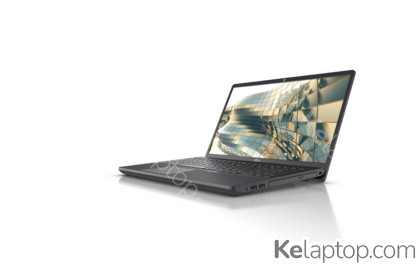
Fujitsu LIFEBOOK A A3511 FPC04993BP
Specs
Prices

Main specs
| Processor | |
|---|---|
| Screen | 15.6" 1920x1080 |
| Hard drive | 512GB SSD |
| RAM | 16GB DDR4-SDRAM |
| Operating system | Windows 11 Pro |
| Graphics card |
Alternatives with equal or higher power at a similar or lower price
From other brands
- 1

ASUS Vivobook 15 F1504VA-BQ252 90NB13Y1-M01H80
€655.981046 - 2

Acer Aspire Go 15 AG15-72P-79N5
€675.11045 - 3
ASUS Vivobook 15 F1504VA-BQ159 90NB13Y1-M01150
€619.171045 - 4

Acer Swift 3 SF314-43-R9A0
€696.951044 - 5

DELL Inspiron 3530 JP8DX
€670.191044 - 6

Lenovo IdeaPad Slim 3 15AMN8 82XQ00L8MH
€687.439.743
Full specifications of Fujitsu LIFEBOOK A A3511 FPC04993BP
| Reference / Part Number | FPC04993BP |
|---|---|
| Release date | September 2021, 5 years ago |
Design
| Product type | Laptop |
|---|---|
| Product colour | Black |
| Form factor | Clamshell |
Image gallery


Screen
| Display diagonal | 39,6 cm |
|---|---|
| Display resolution | 1920 x 1080 pixels |
| Touchscreen | No |
| HD type | Full HD |
| Anti-glare screen | Yes |
Processor
| Processor family | Intel® Core™ i5 |
|---|---|
| Processor manufacturer | Intel |
| Processor model | i5-1135G7 |
| Processor generation | 11th gen Intel® Core™ i5 |
| Processor cores | 4 |
| Processor boost frequency | 4,2 GHz |
| Processor cache | 8 MB |
| Configurable TDP-up frequency | 2,4 GHz |
| Configurable TDP-up | 28 W |
| Configurable TDP-down | 12 W |
| Configurable TDP-down frequency | 0,9 GHz |
Memory
| Internal memory | 16 GB |
|---|---|
| Maximum internal memory | 32 GB |
| Internal memory type | DDR4-SDRAM |
| Memory layout (slots x size) | 2 x 8 GB |
Storage
| Total storage capacity | 512 GB |
|---|---|
| Storage media | SSD |
| Optical drive type | DVD Super Multi |
| Number of SSDs installed | 1 |
| SSD capacity | 512 GB |
| Card reader integrated | Yes |
Graphics
| On-board graphics card | Yes |
|---|---|
| Discrete graphics card | No |
| Discrete graphics card model | Not available |
| On-board graphics card model | Intel Iris Xe Graphics |
| On-board GPU manufacturer | Intel |
Audio
| Number of built-in speakers | 2 |
|---|---|
| Built-in microphone | Yes |
Camera
| Front camera | Yes |
|---|
Network
| Mobile network connection | No |
|---|---|
| Top Wi-Fi standard | Wi-Fi 6 (802.11ax) |
| Wi-Fi standards | Wi-Fi 6 (802.11ax) |
| Ethernet LAN | Yes |
| Ethernet LAN data rates | 10,1000,100 Mbit/s |
| Bluetooth | Yes |
| Bluetooth version | 5.1 |
Ports & interfaces
| USB 2.0 ports quantity | 0 |
|---|---|
| USB 3.2 Gen 1 (3.1 Gen 1) Type-A ports quantity | 3 |
| USB 3.2 Gen 1 (3.1 Gen 1) Type-C ports quantity | 0 |
| HDMI ports quantity | 1 |
| USB 3.2 Gen 2 (3.1 Gen 2) Type-C ports quantity | 1 |
| Ethernet LAN (RJ-45) ports | 1 |
| Headphone outputs | 1 |
| Microphone in | Yes |
Keyboard
| Numeric keypad | Yes |
|---|
Software
| Operating system installed | Windows 11 Pro |
|---|
Processor special features
| Intel Trusted Execution Technology | No |
|---|---|
| Intel VT-x with Extended Page Tables (EPT) | Yes |
| Intel Stable Image Platform Program (SIPP) | No |
| Intel Software Guard Extensions (Intel SGX) | No |
| Idle States | Yes |
| CPU configuration (max) | 1 |
| Embedded options available | No |
| Intel Virtualization Technology for Directed I/O (VT-d) | Yes |
| Intel Virtualization Technology (VT-x) | Yes |
Power
| DC-in jack | Yes |
|---|
Security
| Cable lock slot | Yes |
|---|---|
| Cable lock slot type | Kensington |
Weight & dimensions
| Weight | 1,95 kg |
|---|---|
| Width | 361 mm |
| Depth | 244 mm |
| Height | 23,9 mm |
Frequently asked questions
Is the Fujitsu LIFEBOOK A A3511 FPC04993BP good for gaming?
This laptop was not built for gaming: it relies on the integrated Intel Iris Xe Graphics. Its card's page shows what level it handles current games at.
What is the screen of the Fujitsu LIFEBOOK A A3511 FPC04993BP like?
It carries a 15.6" 1920x1080 display.
Which processor and graphics card does the Fujitsu LIFEBOOK A A3511 FPC04993BP have?
It runs on the Intel Core i5-1135G7 processor with the Intel Iris Xe Graphics graphics. Their pages carry their benchmarks, ranking position and alternatives.
Which operating system does the Fujitsu LIFEBOOK A A3511 FPC04993BP come with?
It comes with Windows 11 Pro preinstalled.
Which ports does the Fujitsu LIFEBOOK A A3511 FPC04993BP have?
According to its spec sheet: 1 × USB-C, 3 × USB-A, 1 × HDMI, Ethernet (RJ-45), card reader.
Does the Fujitsu LIFEBOOK A A3511 FPC04993BP have a touch screen?
No, according to its spec sheet the screen is not a touch screen.
How much does the Fujitsu LIFEBOOK A A3511 FPC04993BP weigh?
It weighs 1,95 kg, a normal weight for its size: easy enough to move around.
When was the Fujitsu LIFEBOOK A A3511 FPC04993BP released?
Its release date is September 2021, 5 years ago.