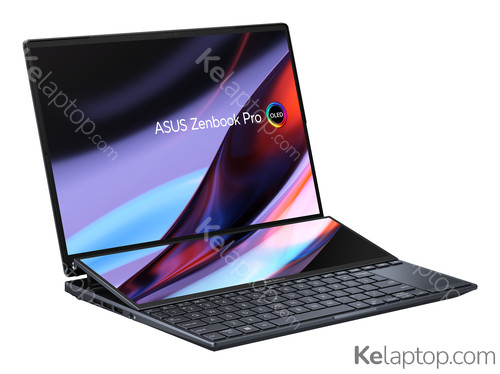
+7
ASUS Zenbook Pro 14 Duo OLED UX8402VU-P1073W
Specs
Prices

Main specs
| Processor | |
|---|---|
| Screen | 14.5" 2880x1800 OLED 120Hz 100% DCI-P3 |
| Hard drive | 1TB SSD M.2 |
| RAM | 16GB LPDDR5-SDRAM |
| Operating system | Windows 11 Home |
| Graphics card | NVIDIA GeForce RTX 4050 6GB GDDR6 |
Alternatives with equal or higher power at a similar or lower price

From other brands

Full specifications of ASUS Zenbook Pro 14 Duo OLED UX8402VU-P1073W
| Reference / Part Number | 90NB10X2-M00540 |
|---|---|
| Release date | April 2023, 3 years ago |
Design
| Product type | Laptop |
|---|---|
| Product color | Black |
| Form factor | Clamshell |
| Color name | Tech Black |
| Market positioning | Performance |
Image gallery


Screen
| Display diagonal | 14.5 " (36,8 cm) |
|---|---|
| Display resolution | 2880 x 1800 pixels |
| Touchscreen | Yes |
| HD type | 2.8K |
| Panel type | OLED |
| Native aspect ratio | 16:10 |
| Display surface | Gloss |
| Maximum display brightness (HDR) | 550 cd/m² |
| RGB color space | DCI-P3 |
| Color gamut | 100 % |
| Maximum refresh rate | 120 Hz |
| Contrast ratio (typical) | 1000000:1 |
| High Dynamic Range (HDR) supported | Yes |
| High Dynamic Range (HDR) technology | HDR True Black 500 |
Processor
| Processor family | Intel® Core™ i9 |
|---|---|
| Processor manufacturer | Intel |
| Processor model | i9-13900H |
| Generación del procesador | Intel Core i9-13xxx |
| Processor cores | 14 |
| Processor boost frequency | 5,4 GHz |
| Processor cache | 24 MB |
| Configurable TDP-down | 35 W |
Memory
| Internal memory | 16 GB |
|---|---|
| Maximum internal memory | 16 GB |
| Internal memory type | LPDDR5-SDRAM |
| Memory form factor | On-board |
Storage
| Total storage capacity | 1 TB |
|---|---|
| Storage media | SSD |
| Optical drive type | No |
| Total SSDs capacity | 1 TB |
| Number of SSDs installed | 1 |
| SSD capacity | 1 TB |
| SSD interface | PCI Express 4.0 |
| NVMe | Yes |
| SSD form factor | M.2 |
| Card reader integrated | Yes |
| Compatible memory cards | MicroSD (TransFlash) |
Graphics
| On-board graphics card | Yes |
|---|---|
| Discrete graphics card | Yes |
| Discrete graphics card model | NVIDIA GeForce RTX 4050 |
| On-board graphics card model | Intel Iris Xe Graphics |
| Discrete graphics card memory | 6 GB |
| Discrete graphics memory type | GDDR6 |
| Fabricante de GPU (unidad de procesamiento gráfico) integrada | Intel |
Audio
| Audio system | Smart Amp |
|---|---|
| Speakers manufacturer | Harman Kardon |
| Built-in microphone | Yes |
Camera
| Front camera | Yes |
|---|---|
| Front camera resolution | 1920 x 1080 pixels |
| Front camera HD type | Full HD |
| Infrared (IR) camera | Yes |
Network
| Mobile network connection | No |
|---|---|
| Top Wi-Fi standard | Wi-Fi 6E (802.11ax) |
| Wi-Fi standards | Wi-Fi 6E (802.11ax) |
| Antenna type | 2x2 |
| Ethernet LAN | No |
| Bluetooth | Yes |
| Bluetooth version | 5.0 |
Ports & interfaces
| USB 2.0 ports quantity | 0 |
|---|---|
| USB 3.2 Gen 1 (3.1 Gen 1) Type-A ports quantity | 0 |
| USB 3.2 Gen 1 (3.1 Gen 1) Type-C ports quantity | 0 |
| HDMI ports quantity | 1 |
| USB 3.2 Gen 2 (3.1 Gen 2) Type-A ports quantity | 1 |
| HDMI version | 2.1 |
| Número de puertos Thunderbolt 4 | 2 |
| Intel® Thunderbolt 4 | Yes |
| Combo headphone/mic port | Yes |
| USB Type-C DisplayPort Alternate Mode | Yes |
Performance
| Repairability index | 7.4 |
|---|
Keyboard
| Numeric keypad | No |
|---|---|
| Pointing device | Touchpad |
| Keyboard backlit | Yes |
Software
| Operating system installed | Windows 11 Home |
|---|---|
| Operating system architecture | 64-bit |
Processor special features
| Intel Flex Memory Access | Yes |
|---|---|
| Intel Trusted Execution Technology | Yes |
| Intel VT-x with Extended Page Tables (EPT) | Yes |
| Intel Stable Image Platform Program (SIPP) | Yes |
| Execute Disable Bit | Yes |
| CPU configuration (max) | 1 |
| Embedded options available | No |
| Intel Virtualization Technology for Directed I/O (VT-d) | Yes |
| Intel Virtualization Technology (VT-x) | Yes |
Battery
| Battery capacity | 76 Wh |
|---|---|
| Battery technology | Lithium-Ion (Li-Ion) |
| Number of battery cells | 4 |
Power
| AC adapter power | 180 W |
|---|---|
| AC adapter frequency | 50 - 60 Hz |
| AC adapter input voltage | 100 - 240 V |
| AC adapter output current | 9 A |
| AC adapter output voltage | 20 V |
| DC-in jack | Yes |
| USB Power Delivery | Yes |
Security
| Windows Hello | Yes |
|---|---|
| Trusted Platform Module (TPM) | Yes |
| Password protection | Yes |
Aprobaciones reguladoras
| Certificados de conformidad | RoHS,REACH |
|---|
Sustainability
| Sustainability certificates | EPEAT Silver,ENERGY STAR |
|---|
Weight & dimensions
| Weight | 3.9 lbs (1,75 kg) |
|---|---|
| Width | 12.7 " (323,5 mm) |
| Depth | 8.8 " (224,7 mm) |
| Height (front) | 0.7 " (1,79 cm) |
| Height (rear) | 0.8 " (1,96 cm) |
Frequently asked questions
Is the ASUS Zenbook Pro 14 Duo OLED UX8402VU-P1073W good for gaming?
You can game on it, though this laptop was not built for it: it carries the dedicated NVIDIA GeForce RTX 4050. Its card's page shows what level it handles current games at.
What is the screen of the ASUS Zenbook Pro 14 Duo OLED UX8402VU-P1073W like?
It carries a 14.5" 2880x1800 OLED 120Hz 100% DCI-P3 display.
Which processor and graphics card does the ASUS Zenbook Pro 14 Duo OLED UX8402VU-P1073W have?
It runs on the Intel Core i9-13900H processor with the NVIDIA GeForce RTX 4050 graphics. Their pages carry their benchmarks, ranking position and alternatives.
Which operating system does the ASUS Zenbook Pro 14 Duo OLED UX8402VU-P1073W come with?
It comes with Windows 11 Home preinstalled.
Which ports does the ASUS Zenbook Pro 14 Duo OLED UX8402VU-P1073W have?
According to its spec sheet: 2 × Thunderbolt 4, 1 × USB-A, 1 × HDMI, card reader, headphone jack (3.5 mm).
Does the ASUS Zenbook Pro 14 Duo OLED UX8402VU-P1073W have a backlit keyboard?
Yes, according to its spec sheet the keyboard is backlit.
Does the ASUS Zenbook Pro 14 Duo OLED UX8402VU-P1073W have a touch screen?
Yes, according to its spec sheet the screen is a touch screen.
How much does the ASUS Zenbook Pro 14 Duo OLED UX8402VU-P1073W weigh?
It weighs 1,75 kg, a normal weight for its size: easy enough to move around.
When was the ASUS Zenbook Pro 14 Duo OLED UX8402VU-P1073W released?
Its release date is April 2023, 3 years ago.