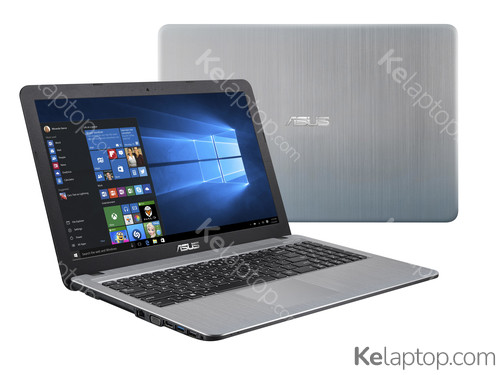
+3
ASUS R540UB-GQ980T
Specs
Prices

Main specs
| Processor | Intel Pentium 4417U 2,3GHz |
|---|---|
| Screen | 15.6" 1366x768 |
| Hard drive | 500GB HDD |
| RAM | 4GB DDR4-SDRAM |
| Operating system | Windows 10 Home |
| Graphics card | NVIDIA GeForce MX110 2GB GDDR5 |
Alternatives with equal or higher power at a similar or lower price
From ASUS

From other brands

Full specifications of ASUS R540UB-GQ980T
| Reference / Part Number | R540UB-GQ980T |
|---|---|
| Release date | August 2019, 7 years ago |
Design
| Product type | Laptop |
|---|---|
| Product colour | Silver |
| Form factor | Clamshell |
Image gallery


Screen
| Display diagonal | 39,6 cm |
|---|---|
| Display resolution | 1366 x 768 pixels |
| Touchscreen | No |
| HD type | HD |
| LED backlight | Yes |
| Native aspect ratio | 16:9 |
| Dual-screen | No |
Processor
| Processor family | Intel® Pentium® Gold |
|---|---|
| Processor manufacturer | Intel |
| Processor model | 4417U |
| Processor frequency | 2,3 GHz |
| Processor cores | 2 |
| Processor cache | 2 MB |
| Processor cache type | Smart Cache |
| Thermal Design Power (TDP) | 15 W |
Memory
| Internal memory | 4 GB |
|---|---|
| Maximum internal memory | 12 GB |
| Internal memory type | DDR4-SDRAM |
| Memory clock speed | 2133 MHz |
| Memory form factor | On-board + SO-DIMM |
Storage
| Total storage capacity | 500 GB |
|---|---|
| Storage media | HDD |
| Total HDDs capacity | 500 GB |
| Number of HDDs installed | 1 |
| HDD capacity | 500 GB |
| Card reader integrated | Yes |
| Compatible memory cards | SD,SDHC,SDXC |
Graphics
| On-board graphics card | Yes |
|---|---|
| Discrete graphics card | Yes |
| Discrete graphics card model | NVIDIA® GeForce® MX110 |
| On-board graphics card model | Intel® HD Graphics 610 |
| Discrete graphics card memory | 2 GB |
| Discrete graphics memory type | GDDR5 |
| On-board graphics card family | Intel® HD Graphics |
Audio
| Audio system | SonicMaster |
|---|---|
| Built-in microphone | Yes |
Camera
| Front camera | Yes |
|---|
Network
| Top Wi-Fi standard | Wi-Fi 5 (802.11ac) |
|---|---|
| Wi-Fi | Yes |
| Wi-Fi standards | 802.11a,Wi-Fi 5 (802.11ac),802.11b,802.11g,Wi-Fi 4 (802.11n) |
| Ethernet LAN | No |
| Bluetooth | Yes |
| Bluetooth version | 4.1 |
Ports & interfaces
| USB 2.0 ports quantity | 2 |
|---|---|
| USB 3.2 Gen 1 (3.1 Gen 1) Type-A ports quantity | 1 |
| USB 3.2 Gen 1 (3.1 Gen 1) Type-C ports quantity | 0 |
| HDMI ports quantity | 1 |
| USB 3.2 Gen 2 (3.1 Gen 2) Type-A ports quantity | 0 |
| USB 3.2 Gen 2 (3.1 Gen 2) Type-C ports quantity | 0 |
| DisplayPorts quantity | 0 |
| Thunderbolt 3 ports quantity | 0 |
| Headphone outputs | 0 |
| Microphone in | No |
| Combo headphone/mic port | Yes |
| ExpressCard slot | No |
| SmartCard slot | No |
Keyboard
| Numeric keypad | Yes |
|---|---|
| Pointing device | Touchpad |
| Full-size keyboard | Yes |
| Windows keys | Yes |
Software
| Operating system installed | Windows 10 Home |
|---|
Processor special features
| Processor ARK ID | 189269 |
|---|
Battery
| Battery capacity | 33 Wh |
|---|---|
| Number of battery cells | 3 |
Power
| AC adapter frequency | 50 - 60 Hz |
|---|---|
| AC adapter input voltage | 100 - 240 V |
| AC adapter output voltage | 19 V |
| DC-in jack | Yes |
Security
| Password protection | Yes |
|---|---|
| Password protection type | BIOS,HDD,User |
Weight & dimensions
| Weight | 1,9 kg |
|---|---|
| Width | 381 mm |
| Depth | 251 mm |
| Height | 27,2 mm |
Frequently asked questions
Is the ASUS R540UB-GQ980T good for gaming?
You can game on it, though this laptop was not built for it: it carries the dedicated NVIDIA GeForce MX110. Its card's page shows what level it handles current games at.
What is the screen of the ASUS R540UB-GQ980T like?
It carries a 15.6" 1366x768 display.
Which processor and graphics card does the ASUS R540UB-GQ980T have?
It runs on the Intel Pentium 4417U processor with the NVIDIA GeForce MX110 graphics. Their pages carry their benchmarks, ranking position and alternatives.
Which operating system does the ASUS R540UB-GQ980T come with?
It comes with Windows 10 Home preinstalled.
Which ports does the ASUS R540UB-GQ980T have?
According to its spec sheet: 1 × USB-A, 1 × HDMI, card reader, headphone jack (3.5 mm).
Does the ASUS R540UB-GQ980T have a touch screen?
No, according to its spec sheet the screen is not a touch screen.
How much does the ASUS R540UB-GQ980T weigh?
It weighs 1,9 kg, a normal weight for its size: easy enough to move around.
When was the ASUS R540UB-GQ980T released?
Its release date is August 2019, 7 years ago.