+6
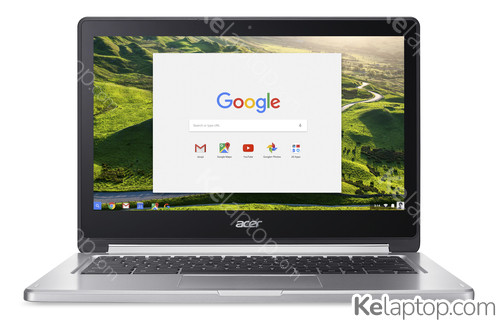
Acer Chromebook R 13 CB5-312T-K95W
Price, score and specs
Prices
In 1 store
In 1 store
Prices
Local stores

Main specs
| Processor | MediaTek M8173C 2,1GHz |
|---|---|
| Screen | 13.3" 1920x1080 IPS |
| Hard drive | 64GB Flash |
| RAM | 4GB LPDDR3-SDRAM |
| Operating system | ChromeOS |
| Graphics card | |
| Other | Keyboard UK English. |
Full specifications of Acer Chromebook R 13 CB5-312T-K95W
| Reference / Part Number | NX.GL4AA.018 |
|---|---|
| Release date | June 2019, 7 years ago |
Design
| Product type | Chromebook |
|---|---|
| Product color | Silver |
| Form factor | Convertible (Folder) |
Image gallery


Screen
| Display diagonal | 13.3 " (33,8 cm) |
|---|---|
| Display resolution | 1920 x 1080 pixels |
| Touchscreen | Yes |
| HD type | Full HD |
| Panel type | IPS |
| LED backlight | Yes |
| Native aspect ratio | 16:9 |
Processor
| Processor family | MediaTek |
|---|---|
| Processor manufacturer | MediaTek |
| Processor model | M8173C |
| Processor frequency | 2,1 GHz |
| Processor cores | 4 |
| Processor cache | 1 MB |
Memory
| Internal memory | 4 GB |
|---|---|
| Internal memory type | LPDDR3-SDRAM |
Storage
| Total storage capacity | 64 GB |
|---|---|
| Storage media | Flash |
| Optical drive type | No |
| Flash memory | 64 GB |
| Card reader integrated | Yes |
| Compatible memory cards | MicroSD (TransFlash) |
Graphics
| On-board graphics card | Yes |
|---|---|
| Discrete graphics card | No |
| Discrete graphics card model | Not available |
| On-board graphics card model | PowerVR GX6250 |
Audio
| Number of built-in speakers | 2 |
|---|---|
| Built-in microphone | Yes |
Camera
| Front camera | Yes |
|---|---|
| Front camera resolution | 1280 x 720 pixels |
| Front camera HD type | HD |
Network
| Mobile network connection | No |
|---|---|
| Top Wi-Fi standard | Wi-Fi 5 (802.11ac) |
| Wi-Fi standards | 802.11a,802.11b,802.11g,Wi-Fi 4 (802.11n),Wi-Fi 5 (802.11ac) |
| Ethernet LAN | No |
| Bluetooth | Yes |
Ports & interfaces
| USB 3.2 Gen 1 (3.1 Gen 1) Type-A ports quantity | 1 |
|---|---|
| USB 3.2 Gen 1 (3.1 Gen 1) Type-C ports quantity | 1 |
| HDMI ports quantity | 1 |
| Headphone outputs | 1 |
| Combo headphone/mic port | Yes |
Keyboard
| Numeric keypad | No |
|---|---|
| Pointing device | Touchpad |
| Keyboard layout | QWERTY |
| Keyboard language | UK English |
Software
| Operating system installed | ChromeOS |
|---|
Battery
| Battery capacity | 54 Wh |
|---|---|
| Battery technology | Lithium Polymer (LiPo) |
| Number of battery cells | 3 |
| Battery capacity | 4670 mAh |
| Battery life (max) | 12 h |
Power
| AC adapter power | 45 W |
|---|
Security
| Fingerprint reader | No |
|---|
Weight & dimensions
| Weight | 3.3 lbs (1,49 kg) |
|---|---|
| Width | 12.8 " (326 mm) |
| Depth | 9 " (228 mm) |
| Height | 0.6 " (15,5 mm) |
| Height (front) | 0.6 " (1,55 cm) |
| Height (rear) | 0.6 " (1,55 cm) |
Packaging content
| Cables included | AC |
|---|
Frequently asked questions
How much does the Acer Chromebook R 13 CB5-312T-K95W cost?
Today it starts at $300 in 1 store. Prices are checked daily.
Is the Acer Chromebook R 13 CB5-312T-K95W good for gaming?
This laptop was not built for gaming: it relies on the integrated PowerVR GX6250. Its card's page shows what level it handles current games at.
How long does the battery of the Acer Chromebook R 13 CB5-312T-K95W last?
The manufacturer declares up to 12 h of battery life. Real duration depends on brightness, workload and battery health.
What is the screen of the Acer Chromebook R 13 CB5-312T-K95W like?
It carries a 13.3" 1920x1080 IPS display.
Which processor and graphics card does the Acer Chromebook R 13 CB5-312T-K95W have?
It runs on the MediaTek M8173C processor with the PowerVR GX6250 graphics. Their pages carry their benchmarks, ranking position and alternatives.
Which operating system does the Acer Chromebook R 13 CB5-312T-K95W come with?
It comes with ChromeOS preinstalled.
Which ports does the Acer Chromebook R 13 CB5-312T-K95W have?
According to its spec sheet: 1 × USB-C, 1 × USB-A, 1 × HDMI, card reader, headphone jack (3.5 mm).
Does the Acer Chromebook R 13 CB5-312T-K95W have a touch screen?
Yes, according to its spec sheet the screen is a touch screen.
How much does the Acer Chromebook R 13 CB5-312T-K95W weigh?
It weighs 1,49 kg: one of the light ones, easy to carry every day.
When was the Acer Chromebook R 13 CB5-312T-K95W released?
Its release date is June 2019, 7 years ago.