+5
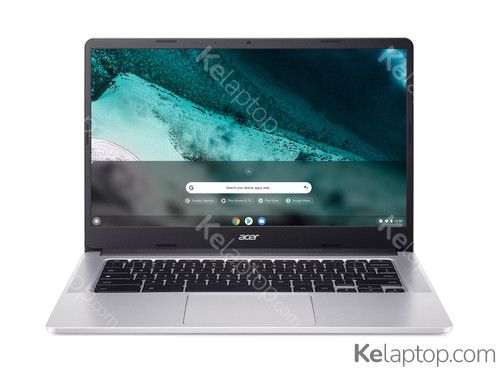
Acer Chromebook 314 C934-C422
Specs
Prices

Main specs
| Processor | Intel Celeron N5100 1,1GHz |
|---|---|
| Screen | 14" 1920x1080 TN 60Hz |
| Hard drive | 128GB Flash |
| RAM | 8GB LPDDR4x-SDRAM |
| Operating system | ChromeOS |
| Graphics card |
Alternatives with equal or higher power at a similar or lower price
From Acer


From other brands
- 1

ASUS Chromebook CX14 CX1405CTA-S60119 90NX0936-M012N0
€318.991032 - 2

Lenovo IdeaPad Slim 3 Chrome 14IAN8 83BN001EUK
€394.771032 - 3

Lenovo Chrome 14M8911 83SX002CSP
€3491029 - 4

Lenovo Chromebook Duet 11M889 83HH003CSP
€3491029 - 5
Lenovo Chromebook Duet 11M889 83HH001HSP
€379.991029 - 6

ASUS Chromebook CM14 CM1405CM4A-S60027
€3191028 - 7

ASUS Chromebook CM15 CM1505CM4A-S70072
€319.911028 - 8

ASUS Chromebook CM15 CM1505CM4A-S70070 90CB0AF2-M00350
€3291028 - 9

ASUS Chromebook Plus CX15 CX1505CTA-S70201
€3799.932 - 10

ASUS Chromebook Plus CX15 CX1505CTA-S70031
€399.999.832
Full specifications of Acer Chromebook 314 C934-C422
| Reference / Part Number | NX.K06EK.009 |
|---|---|
| Release date | August 2024, 2 years ago |
Design
| Product type | Chromebook |
|---|---|
| Product colour | Grey |
| Form factor | Clamshell |
| Colour name | Iron |
Image gallery


Screen
| Display diagonal | 35,6 cm |
|---|---|
| Display resolution | 1920 x 1080 pixels |
| Touchscreen | No |
| HD type | Full HD |
| Panel type | TN |
| Display technology marketing name | ComfyView |
| Native aspect ratio | 16:9 |
| Display surface | Matt |
| Maximum refresh rate | 60 Hz |
Processor
| Processor family | Intel® Celeron® N |
|---|---|
| Processor manufacturer | Intel |
| Processor model | N5100 |
| Processor frequency | 1,1 GHz |
| Processor cores | 4 |
| Processor threads | 4 |
| Processor boost frequency | 2,8 GHz |
| Processor cache | 4 MB |
| Processor cache type | Smart Cache |
Memory
| Internal memory | 8 GB |
|---|---|
| Internal memory type | LPDDR4x-SDRAM |
Storage
| Total storage capacity | 128 GB |
|---|---|
| Storage media | Flash |
| Optical drive type | No |
| Flash memory | 128 GB |
Graphics
| On-board graphics card | Yes |
|---|---|
| Discrete graphics card | No |
| Discrete graphics card model | Not available |
| On-board graphics card model | Intel® UHD Graphics |
| On-board GPU manufacturer | Intel |
| On-board graphics card family | Intel® UHD Graphics |
Audio
| Number of built-in speakers | 2 |
|---|---|
| Built-in microphone | Yes |
Camera
| Front camera | Yes |
|---|---|
| Front camera resolution | 1280 x 720 pixels |
| Front camera HD type | HD |
Network
| Mobile network connection | No |
|---|---|
| Top Wi-Fi standard | Wi-Fi 6 (802.11ax) |
| Wi-Fi standards | Wi-Fi 6 (802.11ax) |
| Antenna type | 2x2 |
| WLAN controller model | Intel Wi-Fi 6 AX201 |
| WLAN controller manufacturer | Intel |
| Bluetooth | Yes |
| Bluetooth version | 5.1 |
Ports & interfaces
| USB 2.0 ports quantity | 0 |
|---|---|
| USB 3.2 Gen 1 (3.1 Gen 1) Type-A ports quantity | 2 |
| USB 3.2 Gen 1 (3.1 Gen 1) Type-C ports quantity | 2 |
| Combo headphone/mic port | Yes |
Keyboard
| Numeric keypad | No |
|---|---|
| Pointing device | Touchpad |
Software
| Operating system installed | ChromeOS |
|---|
Battery
| Battery technology | Lithium-Ion (Li-Ion) |
|---|---|
| Battery life (max) | 11,5 h |
Power
| AC adapter power | 65 W |
|---|
Security
| Trusted Platform Module (TPM) | Yes |
|---|
Weight & dimensions
| Weight | 1,45 kg |
|---|---|
| Width | 326,4 mm |
| Depth | 225 mm |
| Height | 20 mm |
Packaging content
| AC adapter included | Yes |
|---|
Frequently asked questions
Is the Acer Chromebook 314 C934-C422 good for gaming?
This laptop was not built for gaming: it relies on the integrated Intel UHD Graphics. Its card's page shows what level it handles current games at.
How long does the battery of the Acer Chromebook 314 C934-C422 last?
The manufacturer declares up to 11,5 h of battery life. Real duration depends on brightness, workload and battery health.
What is the screen of the Acer Chromebook 314 C934-C422 like?
It carries a 14" 1920x1080 TN 60Hz display.
Which processor and graphics card does the Acer Chromebook 314 C934-C422 have?
It runs on the Intel Celeron N5100 processor with the Intel UHD Graphics graphics. Their pages carry their benchmarks, ranking position and alternatives.
Which operating system does the Acer Chromebook 314 C934-C422 come with?
It comes with ChromeOS preinstalled.
Which ports does the Acer Chromebook 314 C934-C422 have?
According to its spec sheet: 2 × USB-C, 2 × USB-A, headphone jack (3.5 mm).
Does the Acer Chromebook 314 C934-C422 have a touch screen?
No, according to its spec sheet the screen is not a touch screen.
How much does the Acer Chromebook 314 C934-C422 weigh?
It weighs 1,45 kg: one of the light ones, easy to carry every day.
When was the Acer Chromebook 314 C934-C422 released?
Its release date is August 2024, 2 years ago.